


Using Adobe Connect Pro and a Capture Card to Broadcast VGA
February 24, 2009 by Victor
What makes software packages like Adobe Connect Pro, Cisco WebEx, and Microsoft Live Meeting useful is the ability to broadcast anything that is visible on the computer screen as long as you have one of these applications installed and running. However, there are situations where one cannot install a web collaboration/presentation software on a computer but still needs to broadcast the image from it. It is also possible that you are using a device or operating system that is incompatible with your favorite webcasting software. Perhaps you would like to broadcast from a document camera pod with a VGA or DVI interface.
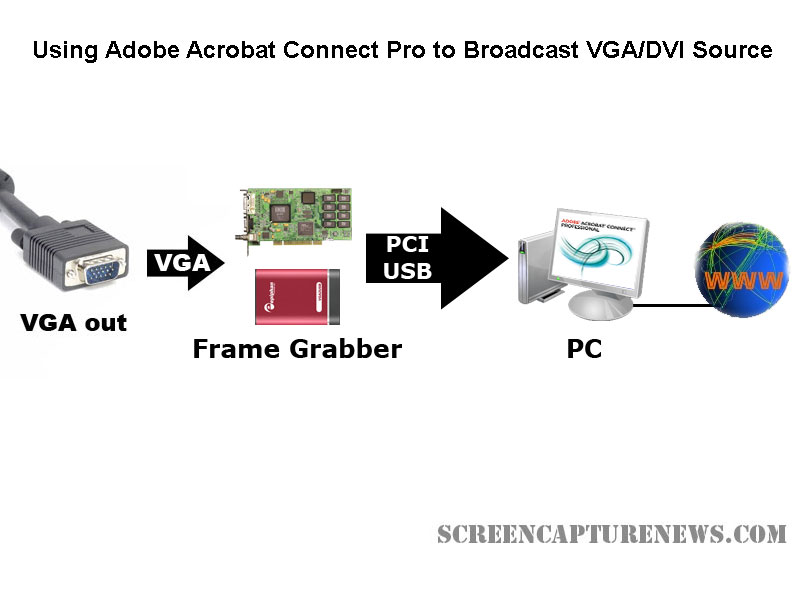
Some situations where an external frame grabber is useful:
- When a network connection is lost, the presenters screen is still being recorded.
- There are not enough system resources to run Connect Pro, or the computer does not allow the installation of Adobe Connect Pro.
- Switching layouts- Once a layout has been switched, the computer sharing the screen in the previous layout needs to be activated again.
- Audio – When working with demos, the demo machine’s audio needs to have the Connect Pro audio installed, but muted (through the voice and camera pod) otherwise the session’s audio will echo.
- Bandwidth – Each demo computer needs to be logged into the Connect Pro meeting. When many computers/devices are connected to a Connect Pro meeting, too much bandwidth is “eaten up”.
- Unsupported devices – Since Adobe Connect Pro is normally only compatible with Windows and Mac OS X, adding a frame grabber allows you to use Connect Pro on any device with a VGA or DVI port.
source: www.connectusers.com
In order to accomplish this, you would need to use a frame grabber connected to a Connect Pro capture computer. You would then launch the application that comes with the grabber on the computer with the VGA grabber and share it with Connect Pro. As long as the VGA source is connected to the grabber itself, then you’re ready to broadcast the image from it!
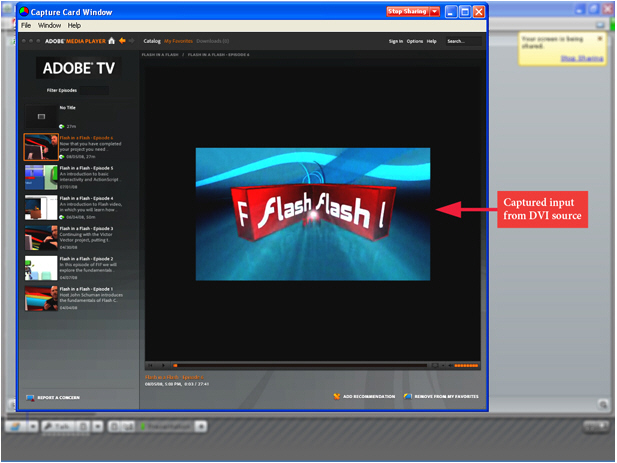
What frame grabber works best with Adobe Connect Pro?
There is no universal answer to this question and it really depends on what your capturing needs are. If you are looking for something cost-effective and do not need to broadcast an image with as lot of movement, then the Epiphan Systems VGA2USB will be enough. However, if you need to broadcast an HD or other high-quality imagery, then we suggest to look into the NCast DCC3.1, Epiphan VGA2Ethernet, or DVI2USB Duo.
For a detailed comparison and description of the most advanced high-resolution frame grabbers on the market, please refer to our frame grabber comparison table.


Comments
Feel free to leave a comment...
and oh, if you want a pic to show with your comment, go get a gravatar!